AI agents in your ERP: what they do, what they cost and who keeps an eye on them
An AI agent in Nori has a name, a job title and a role, like any other user. It reviews receivables, prepares purchases or sums up deliveries, and what matters waits for a person to approve it. Here is how they work and what they cost.
In this article
When people hear "AI agent" they picture a chat that answers questions. Nori already had that: the assistant, which builds the trial balance in Excel or drafts a quote when you ask. An agent is something else. It works even when nobody is typing to it.
One more user, with a name and a job
When you create an agent you give it a name, a job title and a Nori role, the same as when you add a person. The demo has Sofía in collections, Diego in purchasing and Lucía in logistics.
The role decides what it sees and what it can touch. Sofía has finance and CRM permissions, so she looks at receivables and schedules follow-ups, but she cannot see payroll or change prices. If you take a permission away from the role tomorrow, the agent loses it too.
That is why each agent takes a license, like a user with that role.
When it works
There are three ways to put it to work:
- Hand it a task from its desk: "review overdue receivables".
- Schedule it: every day at 8, every Monday, the first day of the month.
- Let a Nori event start it, like an invoice going overdue, a new delivery or an item dropping below its minimum.
Each task keeps what it looked up, what it proposed, what it cost and who approved what. When it finishes it leaves a summary with links to the customers and documents it reviewed.
You can watch it in an office
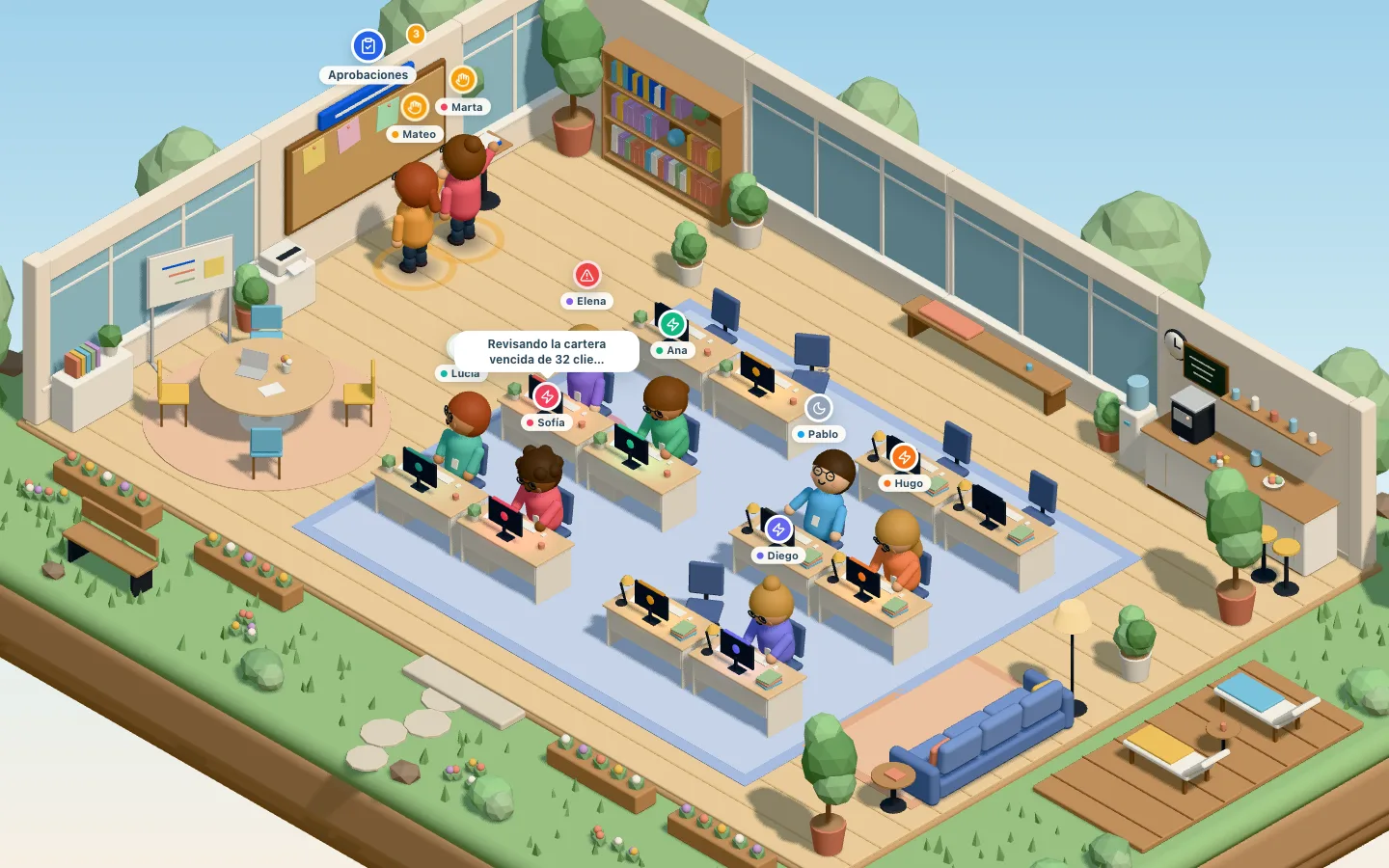

We built a 3D virtual office where each agent has a desk. While it works it sits typing, with a bubble that says what it is doing: "Reviewing overdue receivables for 32 customers". When it needs your sign-off, it stands at the approvals board and raises its hand.
It sounds like decoration, and partly it is. But with five or six agents working, seeing at a glance who is busy and who is waiting for you saves opening one screen after another.
How much freedom you give it
Each agent has a supervisor and one of three autonomy levels:
- Only proposes. Everything it prepares goes to the supervisor's inbox to approve or reject. Every agent starts here.
- Handles low-risk work on its own. Document drafts, CRM notes and draft journal entries are saved without asking. Sending an email or creating something final still waits.
- Acts up to an amount. If what it proposes moves less than the amount you set, it goes ahead; otherwise it waits.
Some things always wait for a person, whatever the level. If an agent proposes a new field on your screens or an automation, someone on your team reviews it before it is used.
You can also pause one agent or switch them all off at once.
What it costs
Agents use Claude, Anthropic's model, with your company's account. You pay usage directly to Anthropic and Nori adds no margin.
We measured a real task in the demo: "review overdue receivables". On the standard model it cost $0.23: ten calls to the model, asking the banking and sales specialists. The same task on the light model cost $0.004. Both reports came out fine. The light one was less thorough: it did not check unapplied payments and asked before proposing the follow-ups.
So we settled on a simple rule:
- The light model for summaries and lookups.
- The standard model for tasks that prepare proposals.
- An automation for anything always done the same way. It runs the same steps without calling the model, so it has no AI cost.
Next to each task you see its average cost, and each agent has a monthly cap.
Where to start
If someone on your team spends every morning on two reports and a spreadsheet, that task is a good candidate. Reviewing receivables, flagging what is below the minimum or summing up late deliveries are jobs with clear rules, and the agent has them ready before your team arrives.
What is still open is how far to trust it. We would start with "only proposes" for a couple of weeks, watch what the supervisor approves and rejects, and then raise the level task by task.
The three demo agents are working at demo.nori.software. Give them something to do and watch them in the office.
Frequently asked questions
Can an AI agent sign in to Nori with a username and password?
No. It cannot sign in to the web or the app. It works on the server with the permissions of the role you gave it.
Who pays for what the agent uses?
Your company, directly to Anthropic, with its own account. Nori adds nothing on top of usage. Each agent has a monthly spending cap.
Can it send emails or create documents without asking?
Only if you let it. You can let it make drafts and notes on its own, or act up to a set amount. Everything else waits for its supervisor's approval.
How do I try the agents?
The Nori demo has three of them working: collections, purchasing and logistics. Give them a task and watch them in the virtual office.