Goods delivery with status lights and scanner
A board that shows which orders are waiting, picking by warehouse, and handing over goods by scanning against the sales order or invoice.
Updated on October 24, 2026
This is for businesses where customers pay at the counter and pick up at the warehouse, or where several areas pick the same order. Open it from Sales › Goods delivery. It's for users with the Warehouse clerk role or the goods delivery permissions.
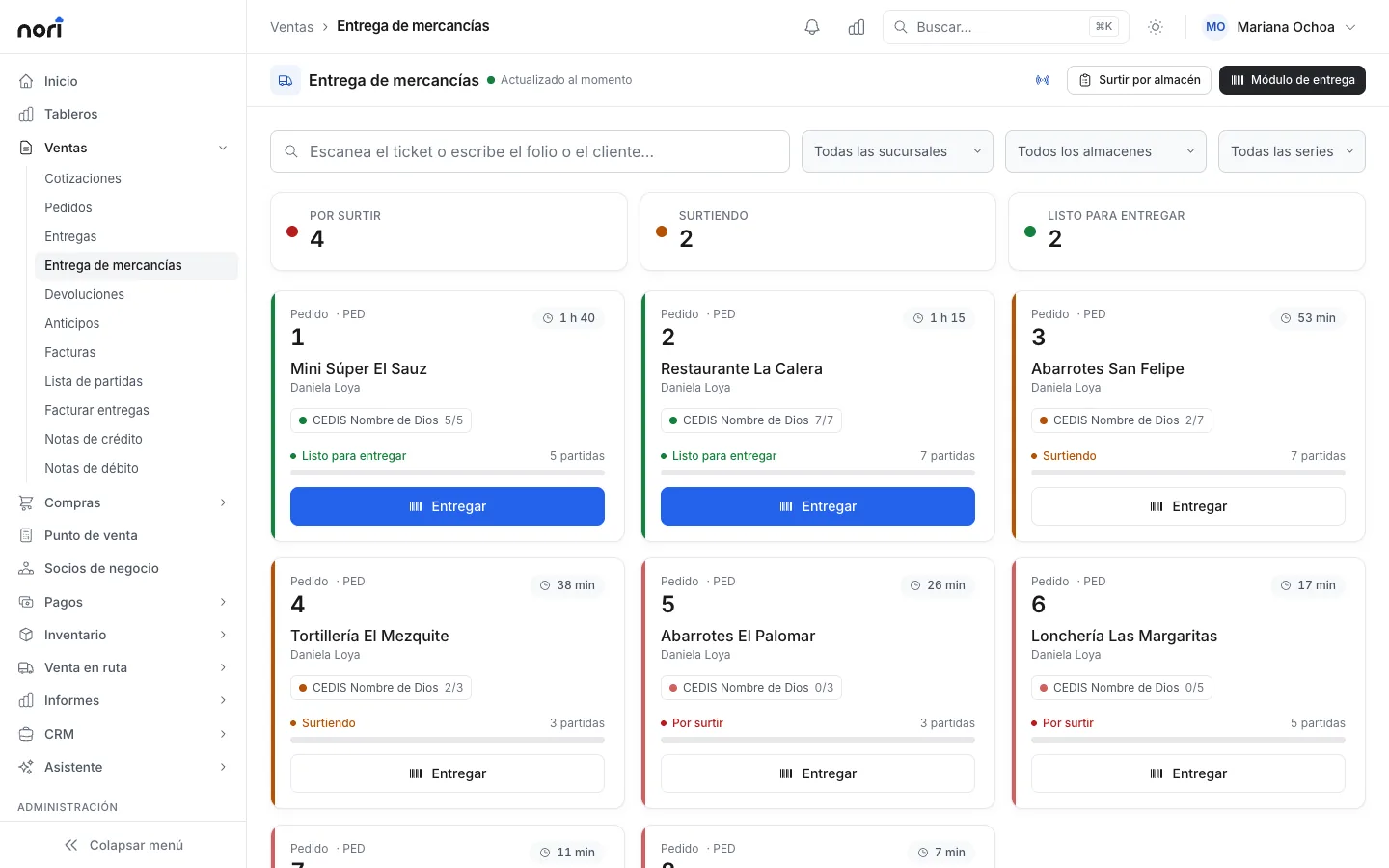
The board
The board shows open sales orders and invoices from series marked Delivered at the warehouse. It refreshes automatically, and each document is in one of three statuses: To pick, Picking or Ready to deliver.
Waiting time turns amber and then red after the minutes you set in Administration › Settings › Sales › Goods delivery. A sound plays when a new order comes in. Turn it off with the sound button. If each warehouse should only see its own orders, filter by branch, warehouse or series.
Picking by warehouse
When an order has items from several areas (for example dry goods and refrigerated), each area opens Picking by warehouse and sees only its own lines:
- Press Start on the document. Nori records who is picking and when.
- Check off each line as you pick it.
- When you're done, press Ready.
- If needed, print the picking ticket. It shows the folio as a barcode to scan at handover.
Deliver by scanning
- Open the Delivery station.
- Scan the ticket or type the sales order or invoice folio. Only open documents come up.
- Lines start at zero. Each scan adds to the item's line. You can scan the item code, the barcode,
3*codeor a scale label. - For items sold by weight, read the weight from the scale or type it, then subtract the tare: number of boxes times the tare per box.
- Press Deliver what was scanned, or Deliver everything if the order is complete.
Line colors show progress: salmon for not picked, yellow for incomplete, green for complete.
Rules that protect inventory:
- An item that isn't on the document is rejected with the message "is not in the original document".
- An item sold by the unit can never go over the pending quantity.
- A weighed item can go slightly over, up to the tolerance your company sets (10% by default). Anything more requires supervisor approval.
- Typing a quantity by hand instead of scanning it also requires approval.
Partial deliveries
If some goods are missing, deliver what you have. On a sales order, the delivery reduces stock and the rest stays open for a later delivery. If the customer no longer wants the rest, check Close the order, dropping the rest. The undelivered quantity is no longer pending and the committed stock is released.
A reserve invoice shows on the board even if its series is not a warehouse one, and is handed over like a sales order: each delivery reduces stock and the rest stays pending.
On an invoice from a Delivered at the warehouse series, stock was already reduced when the invoice was posted. The delivery is only a proof of delivery: the pending quantity is what was invoiced minus what was delivered.
Can't find something?
Tell us what you need to do and we'll get back to you. If you're already a customer, include your company name.